Motion Control Authority
This page describes how to manage motion control authority.
By managing motion control,
The FANUC robot controller’s features (TP programs, Manual Guided Teaching, Jogging, etc.) can be integrated into the ROS 2 system.
The ROS driver can recover from alarms.
The topic /fanuc_gpio_controller/robot_status/motion_possible value indicates who currently has motion control.
When
motion_possibleis true, the ROS driver has motion control.When
motion_possibleis false, the robot controller has motion control.
Note
Even when motion_possible is false, other features besides motion control remain active, such as writing I/O.
The /fanuc_gpio_controller/switch_control_state service allows the transfer of motion control.
When motion_possible is false, calling the following service allows the ROS driver to regain motion control.
ros2 service call /fanuc_gpio_controller/switch_control_state fanuc_msgs/srv/SwitchControlState "status: 1"
Note
To get motion control, check that the following conditions are met; otherwise, the service call will fail.
The operation mode is
AUTO.All alarms are cleared.
The teach pendant is disabled.
All TP programs are aborted.
You can select the desired initial state of motion_possible using a launch argument motion_control.
By default, motion_control is set to 1 and the ROS driver tries to get motion control. If this attempt fails, the driver will not start.
When motion_control is set to 0, the ROS driver can start even if the robot controller has alarms because it does not require motion control. The fanuc_drier can get motion control later by calling the ~/switch_control_state service.
ros2 launch fanuc_moveit_config fanuc_moveit.launch.py robot_ip:=192.168.10.101 robot_model:=crx10ia_l motion_control:=0
Alarm Recovery
When alarms occur on the robot controller, motion_possible becomes false. The ROS driver loses motion control, and the robot controller gains motion control.
To restart the ROS 2 motion control, reset all alarms and call ~/switch_control_state service with “status: 1”.
TP Program Execution and Manual Operations
This is an example of switching control between MoveIt and a TP program.
Launch the ROS driver and move the robot with MoveIt.
Call the
~/switch_control_stateservice with “status: 0”.Confirm that
motion_possibleis false, indicating that motion control has been transferred to the robot controller.Perform general operations on the robot controller. (e.g., TP program execution by UI signals, Manual Guided Teaching, Jogging, etc.)
Confirm that UO[3: PROGRUN], UO[6: FAULT] and UO[8: TPENBL] are
OFF.Call the
~/switch_control_stateservice with “status: 1”.Confirm that
motion_possibleis true, indicating that motion control has been transferred to the ROS driver.Move the robot with MoveIt again.
Free Hand Teaching from ROS 2
This is an example of activating Free Hand Teaching (Manual Guided Teaching) from the ROS driver.
Warning
Collaborative applications require adequate risk assessment. Refer to the Manual Guided Teaching section in the Collaborative Robot Function Manual for details.
Setup on the Robot Controller
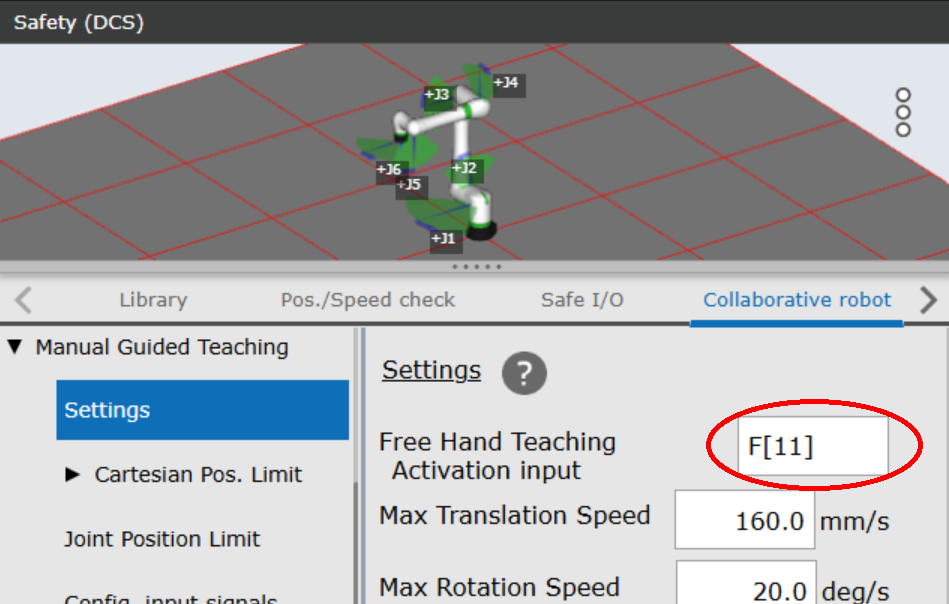
Select a Flag from the gpio configuration file. This example uses F[11].
Set it to
Free Hand Teaching Activation Inputon the robot controller.
Procedure
Call the
~/switch_control_stateservice with “status: 0”.Confirm that
motion_possibleis false, indicating that motion control has been transferred to the robot controller.Set F[11] to
ONby calling the/fanuc_gpio_controller/set_bool_ioservice.The robot’s LED flashes, and you can move the robot manually!
Note
Before returning to the ros2_control, set the Flag to OFF and confirm that Free Hand Teaching has finished. You can use the In manual guided teaching output signal. Its setting exists in Manual Guided Teaching: Status output signals screen.